
Research with a path to action
Discover candidates nationwide with daily data refreshes, add them to a watchlist and work through their diligence before preparing a bid.
Explore nationwide researchTax Sale Resources comparison
Updated · Accrella editorial team
Accrella is a Tax Sale Resources alternative for investors who want nationwide tax-lien research, AI-assisted diligence, reviewed bid preparation and certificate records in one workspace. TSR offers separate Research and Management products. Compare Research for finding candidates and Management for the servicing and reporting you use after purchase.
Keep the source, the bid decision and the certificate together—from your next auction shortlist to your growing portfolio.
Accrella supports nationwide tax-lien research, with data refreshed every day.
comparison table
Choose the right TSR product to compare with the part of your operation you want to run in Accrella.
| Capability | Accrella | Tax Sale Resources |
|---|---|---|
| Auction research | Nationwide research, daily refreshes, watchlists and AI-assisted diligence. | Research: auction/property search, filters, annotations and spreadsheet workflows. |
| Bid preparation | Review required diligence, approve strategies and preview the county CSV before export. | Research: property reports, research tools and spreadsheet exports. |
| Owned-certificate operations | Owned-lien import preview, portfolio records and retained acquisition evidence. | Management: redemption calculations, tasks and bulk data handling. |
| Reporting | Portfolio reporting and supporting records for your review process. | Management: configurable reports, exports and access groups. |
| Subscription model | Published Standard, Pro and Enterprise plans with managed-lien capacity and seat limits. | Research uses report/data allowances; Management has separate pricing. |
Based on the official sources linked below. A listed workflow is not a claim of complete feature parity; confirm specialist servicing and integrations before replacing them.
Discover candidates nationwide with daily data refreshes, add them to a watchlist and work through their diligence before preparing a bid.
Explore nationwide researchReview required diligence and approve the strategy before county CSV export. Your bid preparation stays connected to the facts and unresolved questions behind it.
See the bid-review workflowPreview owned-lien imports, maintain portfolio records and keep acquisition evidence for reporting and future review.
Explore certificate evidence01
Choose Accrella when you want the research, decision and owned-certificate record to stay connected throughout your regular work.
Build a watchlist, review the source facts and work through open questions in the candidate record. Use the same context to prepare the strategy you approve.
Use the county bid-sheet preview after required diligence and strategy review. Check the working file against the auction host’s submission requirements.
Bring owned certificates through import preview, reconcile the records and keep acquisition evidence available for your next report or review.
02
Make the decision around the actual work you do each week. A research subscription and a servicing system can have different requirements.
Compare candidate discovery, diligence and the bid file for one target auction. Use the current county source to check identifiers and sale dates.
Review TSR ResearchIf you depend on redemption calculations, lender access or a particular reporting format, verify those specific requirements before moving that work.
Review TSR ManagementKeep specialist services where you need them and use Accrella for the research, bid review and certificate records you want to organize. Financing, trading and legal work need their own arrangements.
03
Begin with a small group you can reconcile completely, then use that checked set as the basis for the rest of your portfolio.
Retain original exports and documents with certificate IDs, county, purchase details and historical records. Note which files come from Research and which come from Management.
Map the owned-lien fields Accrella supports and check the preview for missing values or duplicates. Preserve any history or specialist fields that need a separate record.
Match the imported records to the original file before expanding. Start the next auction shortlist in Accrella so new diligence and bid preparation begin in the workspace.
04
Compare managed-lien capacity, users and the services you actually need. A lower headline price alone does not establish a lower total cost.
Standard supports 200 managed liens and Pro supports 1,000, each with one user seat. Enterprise provides custom seats and limits. See current introductory and ongoing prices.
Compare Accrella plansConfirm current Research allowances and Management pricing for your operation, including any additional services you plan to keep.
Check TSR pricingInside Accrella
See how a certificate record brings source details, review requirements and retained notes into view. Keep the context available when you return to the next decision.
Explore the certificate record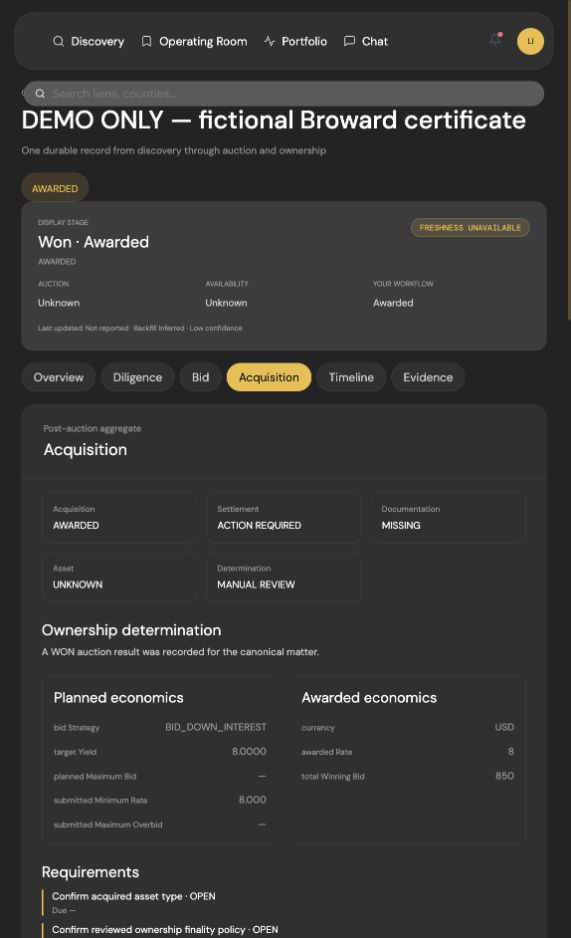
FAQ
Practical answers to help you choose your next step.
Yes. Accrella is an alternative for nationwide tax-lien research, AI-assisted diligence, reviewed bid preparation and certificate records. Compare the Research and Management functions you actually use, and verify any specialist servicing requirements before changing systems.
Research focuses on finding and analyzing tax-sale candidates. Management focuses on work after purchase, including certificate servicing and reporting. Include both in the comparison if your current operation uses both.
Accrella supports owned-lien import preview and import. Export the records you are authorized to use, map supported fields and reconcile a small set before expanding. A turnkey transfer of every TSR field, document or transaction history is not established.
Compare the plans for your managed-lien count, users, research allowances and servicing needs. Accrella publishes its plans; TSR Research and Management have different pricing models. This comparison does not claim a universal price advantage.
See Accrella plansAccrella provides certificate records, imports, reporting and acquisition evidence. Confirm your required redemption calculations, lender access, integrations and reporting formats individually. Keep a specialist service when your operation still needs it.
Sources and further reading
Official Tax Sale Resources Research, Management and pricing pages reviewed September 15, 2026. Accrella authored this comparison using published descriptions, not independent hands-on testing.
Your next move
Bring research, diligence and certificate records into one workspace. Start with your next candidate or the certificates you already own.
Product comparison only; not investment, legal or tax advice. Confirm current source records, requirements and subscription terms before acting.
First published .