
Decide what is moving
An auction bid list contains candidates, not proof of purchased certificates. Sort your records into prospective bids, owned liens and property transactions before mapping any file.
Compare the two workflows firstMarketplacePro alternative
Updated · Accrella editorial team
If you already use MarketplacePro and want to move certificate records into Accrella, start with a small, reconciled set of owned liens. Keep prospective auction research and property-marketplace transactions separate. This checklist explains what to retain, what the owned-lien import accepts and what to verify before expanding.
Choose the tools first; use this page to plan the record handoff. There is no direct MarketplacePro migration assumed here.
Accrella supports nationwide tax-lien research, with data refreshed every day.
An auction bid list contains candidates, not proof of purchased certificates. Sort your records into prospective bids, owned liens and property transactions before mapping any file.
Compare the two workflows firstRetain the original export, attachments and transaction confirmations. Ask MarketplacePro which fields and documents you can export and retain under its current terms.
MarketplacePro product informationAccrella offers a file preview for owned liens. Review rejected rows, duplicate indicators and recommendations against your originals before committing the records.
Inspect the controlled import example01
MarketplacePro describes auction research and bid lists alongside a property marketplace. The destination depends on what each record represents; a property identifier alone does not establish a certificate purchase.
Keep the county, parcel identifier, sale date, official sale URL and bid notes. Research the candidate in Accrella and add it to your watchlist. Do not import a downloaded bid list as owned liens.
Use the certificate and acquisition documents to establish the identifiers, amount, purchase date and applicable interest rate. These records are candidates for the owned-lien import after field mapping and reconciliation.
Retain listing history, contracts and settlement records in the system appropriate to those transactions. The owned-lien import is not a property-marketplace or closing-record migration.
02
Use the template available in Accrella’s import drawer. A similarly named field in another tool can mean something different; compare it with the certificate or acquisition record before mapping.
Required fields include certificateNumber, parcelId, stateCode and countyFips. Preserve the full identifiers and confirm the county code. An address or marketplace listing ID is not a substitute for a certificate number.
The template also requires faceValue, purchasedAt, statutoryInterestRate and propertyType. Keep faceValue separate from the optional purchasePrice. A planned bid or listed price is not evidence of the amount you paid.
taxYears and ownerName are recommended; propertyAddress and purchasePrice are optional. Keep source links, research notes, attachments and transaction history in your original archive unless you have checked a supported destination for them. Importing a row does not transfer every field or document.
03
Choose a few known certificates with acquisition records you can check. Accrella accepts .csv, .tsv and .xlsx files; legacy .xls files need conversion. Keep the unmodified originals.
Resolve rejected rows and duplicate warnings. Check certificate numbers, county and parcel identifiers, face values and purchase dates against the source documents. Review recommendations even when a row is accepted.
After saving the checked batch, compare the accepted count and recorded amounts with the preview and your source file. Investigate missing records or conflicting identifiers before importing the rest.
Preserve access to marketplace transactions, specialist reports and auction-host confirmations you still need. A successful import does not show that Accrella replaces every service or that you can discard the old archive.
Review product scope and plansInside Accrella
See how a certificate record brings source details, review requirements and retained notes into view. Keep the context available when you return to the next decision.
Explore the certificate record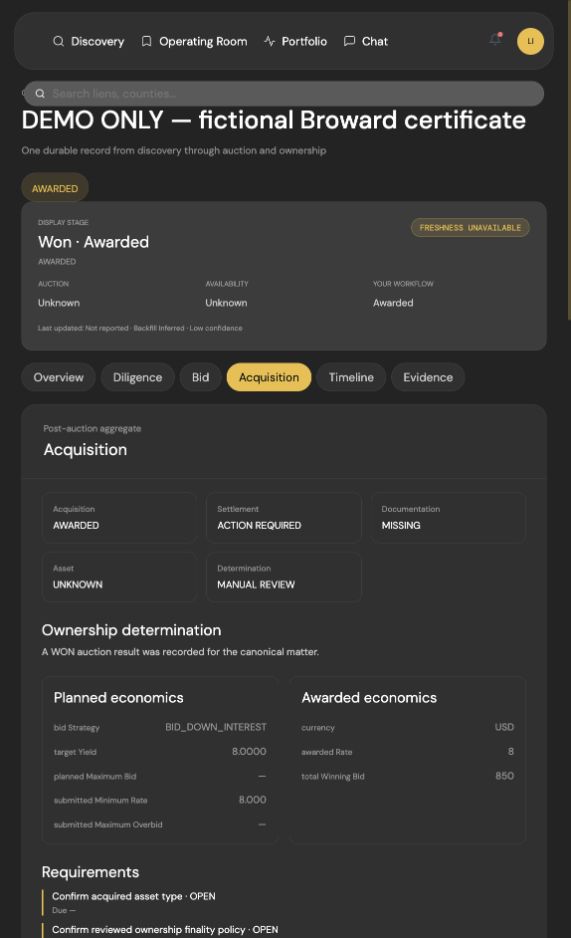
FAQ
Practical answers to help you choose your next step.
A prospective bid list is not an owned-certificate ledger. Use it as research input and confirm the current official sale record. Only map purchased certificates to the owned-lien import when you can establish the required certificate, jurisdiction, amount, date and rate fields.
No direct MarketplacePro migration is assumed. The owned-lien import maps supported record fields; it does not establish automatic transfer of every note, attachment or property transaction. Retain the originals and verify each destination before changing your process.
Use the separate comparison to evaluate research, auction preparation, portfolio records and marketplace requirements. This page covers the handoff after that decision.
Read Accrella vs MarketplaceProSources and further reading
MarketplacePro’s public product descriptions reviewed October 7, 2026. Accrella’s field guidance follows its current owned-lien import template. This is vendor-authored transfer guidance, not a hands-on MarketplacePro export test or a claim of an automatic integration.
Your next move
Bring research, diligence and certificate records into one workspace. Start with your next candidate or the certificates you already own.
Record-transfer guidance is not investment, legal or tax advice. Confirm certificate facts with the official county record and retain the transaction evidence your review requires.
First published .